All modulesTime & attendance

Replace the punchcard with one tap.

Geofenced clock-ins and automatic timesheets, for teams spread across sites and shifts rather than desks.

Get a quoteOpen the sandbox

Part of Mowazaf HRMS. The sandbox is a shared demo company that resets every night.

Site radius

  • Workplace
  • Accepted · on site
  • Raised · outside the radius
Outside by a margin the supervisor sees

Why this module exists

The timesheet is a payroll input, not a filing exercise.

Every late arrival, every swapped shift and every unpaid hour becomes a line on somebody’s payslip — so a clock-in records where, when and how it was verified, and anything that does not line up is raised.

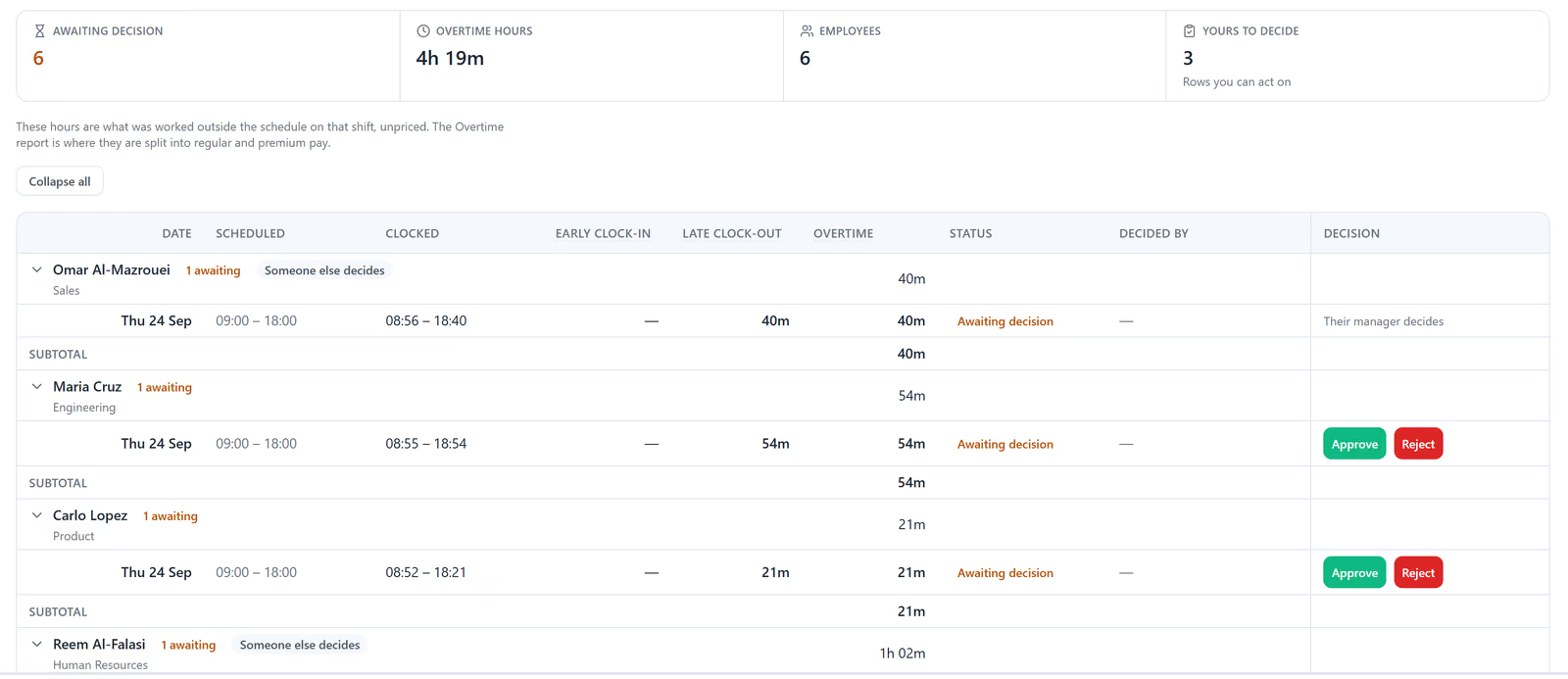
The overtime approvals queue in Mowazaf: six items awaiting a decision totalling 4 hours 19 minutes, and one row per person comparing the scheduled shift with the clocked times, the overtime it produced, and Approve and Reject where the viewer is the decider.Sample data

The day

What a shift looks like once it is over.

The scheduled shift, what happened against it, and the pieces that need a human — on one line.

One day · illustrative

Clocked in

Scheduled

Recorded

08:0013:0018:00
  • Late start
  • Break
  • Overtime

Illustrative day. Not live data.

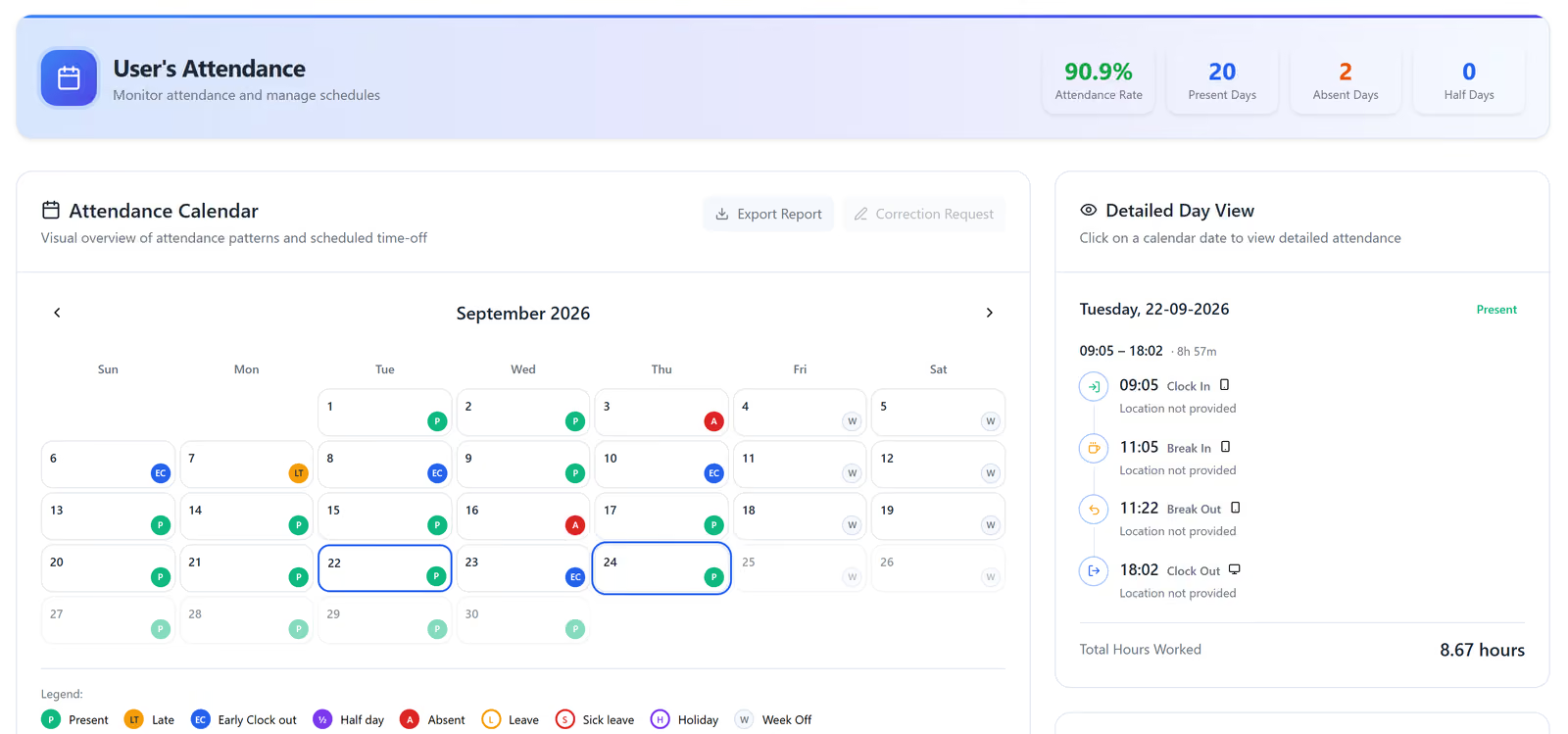
One employee’s September attendance in Mowazaf: a 90.9% attendance rate, a calendar marking each day present, late, early clock-out, absent or week off, and 22 September opened to show its clock-in, break and clock-out times and 8.67 hours worked.Sample data
  1. The day’s own legend

What it records

What a week produces without anyone typing it.

It assembles itself as the week happens.

  • Geofenced clock-in and outOnly when you are on site.
  • Face-recognition clock-inFor sites where who held the phone matters.
  • Smart timesheetsLate arrivals, overtime and breaks fall out on their own.
  • Correction requestsForgot to clock out? A request, an approval, an intact trail.
  • Shifts and swapsSchedules, rotations, and a swap the approver can see.
  • Team availabilityWho is in, who is on leave, who is late.

A swap · illustrative

EMP-0142Early shiftLate shift
EMP-0151Early shiftLate shift

One approval, before either takes effect

Illustrative. No roster, dates or names appear on this drawing.
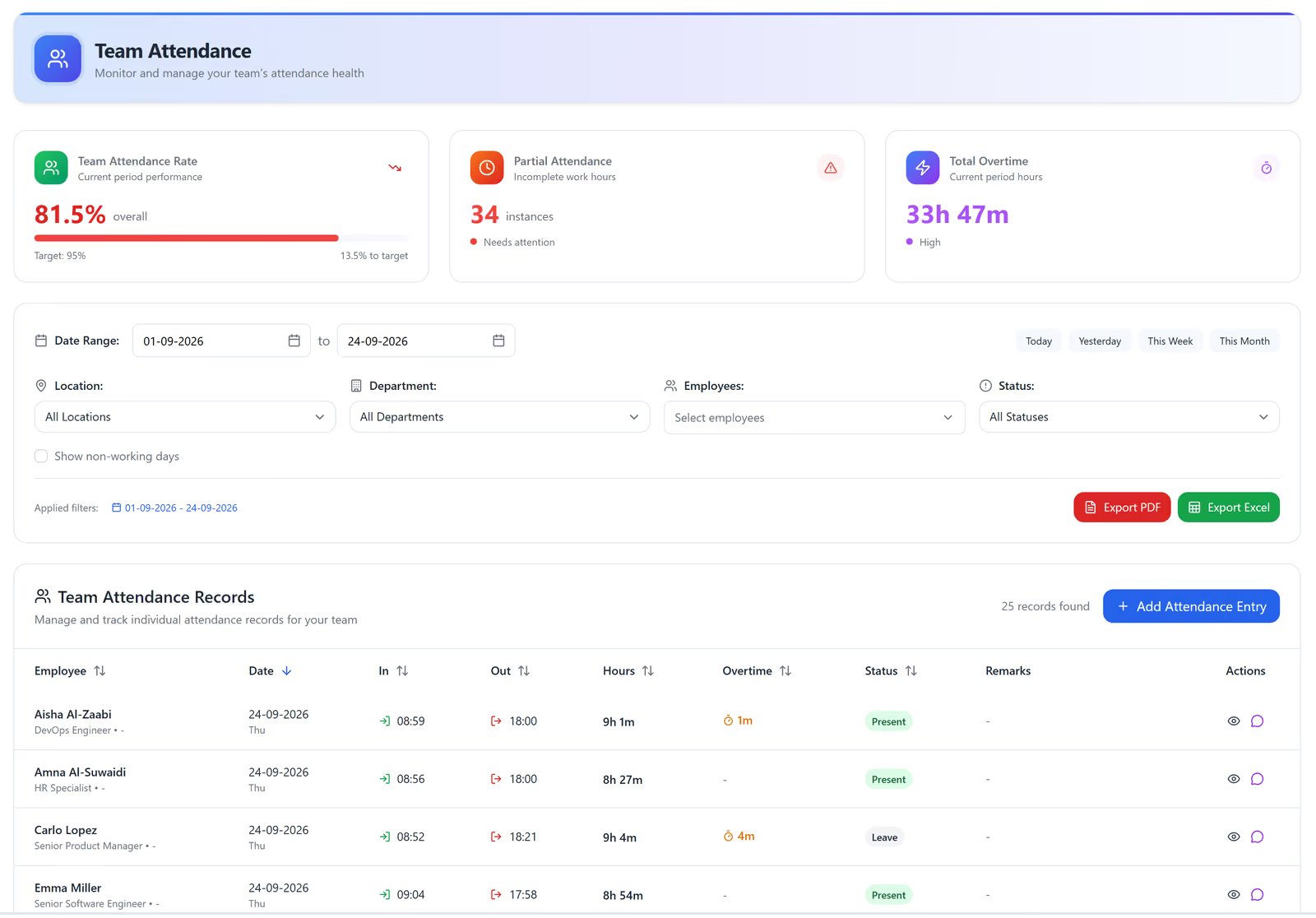
Team attendance in Mowazaf: an attendance rate measured against its target, a count of partial-attendance days, total overtime hours, and a records table showing each person’s clock-in, clock-out, hours worked, overtime and status.Sample data

On site

On site, or raised with the distance attached.

A clock-in inside the radius is accepted quietly. One outside it is raised, with its distance attached.

Three punches, one shift pattern

  • Inside the radiusAcceptedRecorded, nobody notified.
  • Outside the radiusRaisedRecorded, with the distance attached.
  • No clock-outOpenA correction request sits with the supervisor.

All three are on the timesheet.

Illustrative. Nothing is silently accepted and nothing is thrown away.

Common questions

Does attendance feed payroll directly?

Yes. Approved time reaches the payroll run without an export and re-import in between.

Can staff clock in from the phone they already have?

Yes. Mowazaf ships native iOS and Android apps, built around clock-in.


Tell us how many sites and shifts you run.

We will come back with a quote for Mowazaf HRMS, in writing within one business day. Or open the sandbox and look through attendance in the demo company first.

The sandbox

One step before the sandbox

The sandbox is the real application, running in a shared demo company that resets every night, so nothing you enter in it is kept. Tell us who you are and we will take you straight in.

Required unless marked optional.

With your country code, e.g. +44 20 7946 0000.